Degoog The no-JS page
A second search page at /nojs, built out of server-rendered
HTML and CSS. No script tags, anywhere.
What it is
The normal Degoog UI needs JavaScript. It streams page one over SSE, renders results in the browser, keeps your preferences in IndexedDB and fetches more results as you scroll. That is a lot of machinery, and some people cannot or will not run it: text-mode browsers such as lynx and w3m, older phones, locked-down work machines, screen reader setups people already trust, and anyone browsing with scripts off on purpose.
/nojs is for them. The server renders the whole page, sends it,
and the browser's only job is to draw it. Every filter, tab and page link is
an ordinary <a> or a form submit. There is no script tag in
the markup and none injected later.
It is a second front door to the same instance, not a separate instance. Same engines, same cache, same rate limits, same extensions where those extensions said they can cope.
Turning it on
It is off by default. Settings, Server, No-JS page has the switch, and it takes effect on the next request. No restart.
Once it's on, /nojs is the home page and searches go to
/nojs/search?q=adam+sandler. Tacking ?q= onto plain
/nojs just shows you the home page again. Turning it on also adds
a built-in No-JS page plugin with a !nojs bang
(!no-js and !nojavascript work too), so you can jump
to it from the normal page, or search it straight away with
!nojs adam sandler.
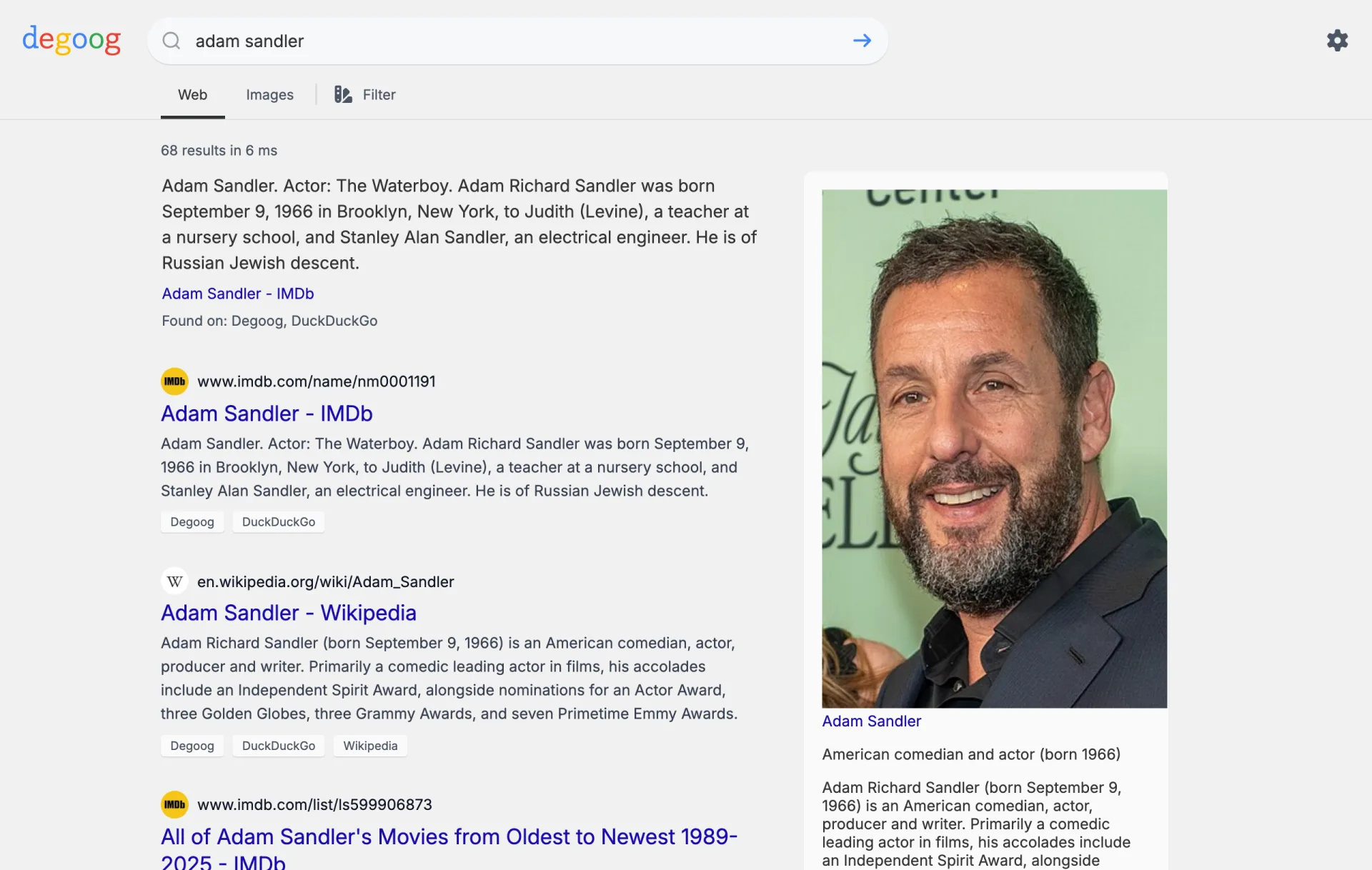
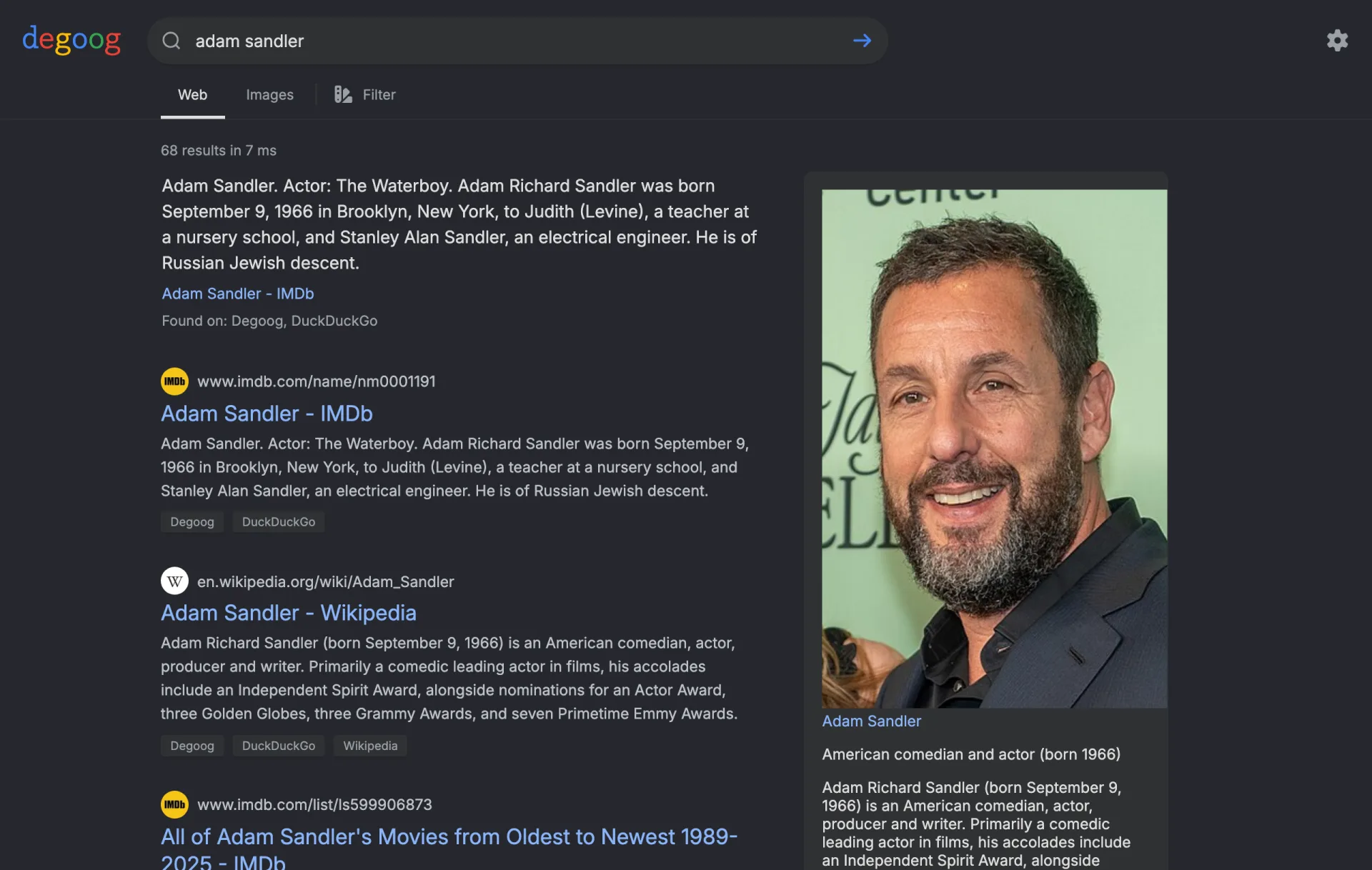
While the switch is off, /nojs answers the same 404 as
/purple-elephant: same status, same headers, same bytes. There is
nothing there to fingerprint and nothing to probe. Turning it back off closes
the door again just as quickly, so a public instance that is getting hammered
does not have to wait for a restart window.
What you give up
Everything below is a consequence of having no JavaScript, not a feature waiting to be written.
| On the normal page | On /nojs |
|---|---|
| Autocomplete as you type | Nothing. Type the whole query and submit. |
| Infinite scroll | Numbered pagination. Each page is a fresh request. |
| Tabs and filters update in place |
Every tab, time filter, language and date range reloads the page. The
filter panel is a <details> element that stays open
when a filter is active.
|
| Your own engine toggles and preferences | None. Those live in IndexedDB, which needs scripts. Searches use the instance's default engine set for everyone. |
| Theme follows your saved preference |
Your operating system decides. The page reads
prefers-color-scheme, so it is dark if your desktop is
dark. An admin who set an instance default theme overrides that for
everyone. There is no switcher, because remembering a choice per visitor
means a cookie, and a cookie is worse than asking your OS.
|
| Image lightbox, media preview, result actions | Gone. The result cards themselves are the same ones the normal page draws, favicon, engine tags, date, insecure badge and video thumbnail included. Only the three-dot domain menu is absent, because blocking and scoring a domain needs scripts. |
| Infinite scroll through image results | Image searches still get the image grid rather than a list of web cards, laid out with CSS columns instead of the measured masonry the normal page builds. Clicking a tile opens the source page, since the lightbox needs scripts. |
The footer is the same one the home page has always had, a version link, the repo, the docs, plus one extra link back to the full app so anyone who landed here by accident can leave.
What you do not give up is the look of the thing. The page is built from the same theme shells and partials the normal page uses, filled in on the server instead of in your browser, so a theme that restyles one restyles both.
The engine breakdown and retry
The sidebar on the right lists every engine the search touched, how many results it returned and how long it took. An engine that failed is marked, and hovering its result count tells you what went wrong, blocked, rate limited, captcha, timeout.
Each engine also gets a retry link. On the normal page that is a fetch in the
background. Here it is an ordinary link back to
/nojs/search with a retry= parameter, carrying your
query, tab, page and filters with it. The server re-runs that one engine
without its cache, merges the fresh results with what the others already
returned and sends the page back. Worth knowing: after a retry the page links
disappear, because a single-engine retry does not tell the server how many
pages the whole search has. Run the search again to page further.
The breakdown is absent on plugin tabs, and so are the retry links. Those searches go through a different handler that has no retry path.
Bangs, commands and panels
Bang commands work, including engine shortcuts. Result panels from plugins work. Both are opt-in per extension, and the default is no.
A panel that has not opted in is simply absent. You never asked for it, so
nothing announces its absence. A command that has not opted in shows a short
notice instead of its output, because you did type !something and
deserve an answer rather than an empty page. The notice points you at the
extension's developer, which is the only person who can change it.
The reason for the default is that panel and command HTML comes from
third-party code, and it is free to contain a <script> tag
or an inline onclick. This page promises it contains neither, and
the only honest way to keep that promise is to render nothing the author has
not explicitly cleared. Developers can read the whole contract in
No-JS extension support.
The CSS bot check
Bot control's browser verification works by putting a signed token in a stylesheet link. Real browsers fetch stylesheets. Scrapers that read only the HTML do not, and they collect strikes until they are banned. See Bot control.
Apply the CSS bot check to no-JS searches extends that to
/nojs. It is off by default, and you should think hard before
turning it on, because lynx and w3m do not fetch stylesheets either. Turn it
on and you will ban exactly the visitors the page exists for.
It is there for the case where /nojs becomes the soft underbelly
of a public instance: cheap to scrape, no scripts to execute, one HTTP GET per
page of results. If you are watching that happen in your logs, the tradeoff
may be worth it. If you are not, leave it alone.
Rate limiting needs no such decision. /nojs shares the normal
search limiter, so a no-JS search counts against the same per-IP budget as any
other search. See
Rate limiting.
Serving it on its own hostname
A common wish is nojs.example.org rather than
example.org/nojs. That works, with one rule.
Every link the page emits is derived from the path of the request that
produced it. Ask for /nojs/search and the tab, filter and
pagination links all come back starting with /nojs. So your proxy
must preserve the /nojs prefix upstream. Send
the same paths through that the browser asked for, and everything holds
together.
The second rule is that the page is not self-contained. It pulls its
stylesheets from /public and /theme, theme assets
from /themes, and thumbnails from /api/proxy. Proxy
only /nojs and you get an unstyled page with broken images. The
simplest fix is to forward the whole hostname to the same origin and redirect
its root.
server {
    listen 443 ssl;
    server_name nojs.example.org;

    # so visitors can type the bare hostname
    location = / {
        return 302 /nojs;
    }

    location / {
        proxy_pass http://127.0.0.1:3000;
        proxy_set_header Host              $host;
        proxy_set_header X-Real-IP         $remote_addr;
        proxy_set_header X-Forwarded-For   $proxy_add_x_forwarded_for;
        proxy_set_header X-Forwarded-Proto $scheme;
    }
}
That hostname now serves the whole instance, which is fine if
example.org is public anyway. To keep it to the no-JS page and
its assets, replace the catch-all with one location per prefix:
/nojs, /public, /theme,
/themes, /api/proxy, and
/style if you turned the CSS check on. Anything else can return
404.
Degoog ignores X-Forwarded-For unless you set
DEGOOG_DISTRUST_PROXY=0. Without it every no-JS visitor shares
the proxy's address, so they share one rate limit budget and one ban. Only set
it when you control the proxy and it strips incoming forwarded headers.
The setup that does not work
Do not strip the prefix:
# broken
location / {
    proxy_pass http://127.0.0.1:3000/nojs/;
}
The first request looks right. Then the page comes back with links pointing at
/nojs/search, the browser asks for
nojs.example.org/nojs/search, nginx rewrites that to
/nojs/nojs/search upstream, and you get a 404 on the first click.
Serving /nojs at the root of a hostname is not supported yet.
What you see instead, if the upstream path never carried the prefix, is worse
than a 404. Degoog cannot tell where /nojs lives, so it falls
back to the instance root and every link on the page points into the full
JavaScript app. To a visitor it looks like the no-JS page is throwing them
back onto the normal site at random. The server logs one warning the first
time this happens, naming the path it was handed and the proxy setting that
usually causes it. If somebody reports being bounced off
/nojs, grep your logs for it before you go looking anywhere else.
If your instance runs under a sub-path via DEGOOG_BASE_URL, the
no-JS links already carry that base path. You do not need to add it in the
proxy.
POST search is honoured, but it cannot hide everything.
With the instance-wide POST search setting on, the no-JS search forms POST
and /nojs/search accepts them, so your query stays out of the
URL on submit. Pagination and the result tabs are plain links, though, and
links can only carry a query string. The moment someone opens page two or
switches tab, the query is back in the address bar and in browser history.
Restoring that would need JavaScript, which is the one thing this page does
not have.